By Lordpatil · · 5 min read
Internals of the LangGraph Postgres Checkpointer (AsyncPostgresSaver)
An in-depth developer's guide to LangGraph's PostgreSQL checkpointer, its schema, and practical strategies for high-performance state management in LLM applications.
from langgraph.checkpoint.postgres.aio import AsyncPostgresSaver
Building stateful applications with Large Language Models (LLMs) is complex. You need to manage conversation history, handle intermediate steps, and recover from failures. LangGraph provides a powerful solution for this by modeling LLM workflows as graphs. At the core of its state management is the "checkpointer," a component responsible for persisting the state of your graph.
Recently, I’ve been building a chatbot application, and I chose LangGraph’s asynchronous PostgreSQL checkpointer (AsyncPostgresSaver) to handle my conversation history. However, as my application grew, I ran into performance challenges that forced me to look beyond the API and dive deep into the source code. This blog post is a summary of that journey—a developer’s guide to understanding how LangGraph uses PostgreSQL, what its database schema looks like, and how you can architect your application around its strengths and weaknesses.
LangGraph Checkpointer Architecture ⚙️
At a high level, the checkpointer’s job is to save a "snapshot" of your graph's state at various points of execution. The AsyncPostgresSaver does this by interacting with a PostgreSQL database in a non-blocking way.
When you invoke a graph with a checkpointer enabled, LangGraph automatically saves the state after each step. This process involves a few key SQL operations that reveal how the system is designed.
Saving a Checkpoint When a new state is saved, the checkpointer doesn't just overwrite the old one. It creates a new versioned entry. The primary data is stored as a JSONB object, which is efficient for structured data.
-- Inserts or updates the main checkpoint metadata
INSERT INTO checkpoints (thread_id, checkpoint_ns, checkpoint_id, parent_checkpoint_id, checkpoint, metadata)
VALUES ($1, $2, $3, $4, $5, $6)
ON CONFLICT (thread_id, checkpoint_ns, checkpoint_id) DO UPDATE
SET checkpoint = EXCLUDED.checkpoint, metadata = EXCLUDED.metadata;
Retrieving the Latest State
To resume a conversation, your application needs the most recent checkpoint. The checkpointer retrieves this by finding the record with the latest checkpoint_id for a given thread_id.
-- Fetches the most recent checkpoint for a specific conversation thread
SELECT checkpoint_id, parent_checkpoint_id, checkpoint, metadata
FROM checkpoints
WHERE thread_id = $1 AND checkpoint_ns = $2
ORDER BY checkpoint_id DESC
LIMIT 1;
The Database Schema: A Tour of the Tables 🗺️
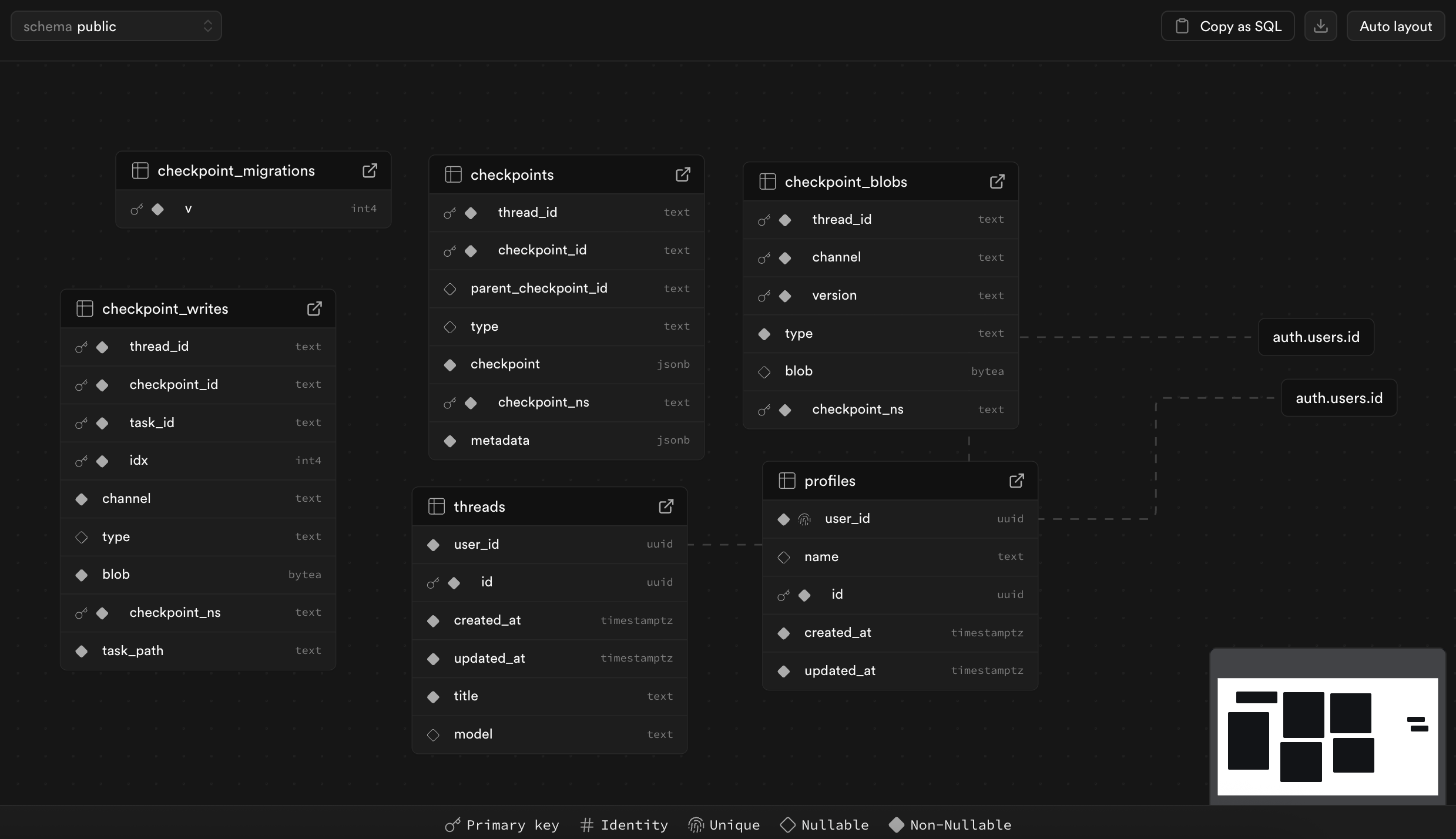 Figure: Schema of the tables used by LangGraph's Postgres checkpointer and related application tables.
When you run the checkpointer.setup() method, LangGraph creates a few tables in your database. Understanding the role of each is key to grasping the architecture.
checkpoints: This is the main table. Each row represents a snapshot of your graph's state. It contains metadata, athread_idto group all snapshots for a single conversation, and acheckpointcolumn (JSONB) that holds the core state values.checkpoint_blobs: This table is for storing large data. When a value in your graph’s state is too big or complex to fit nicely in the JSONB column (like a list of message objects), it gets serialized and stored here as a binary blob (BYTEA). The maincheckpointstable then just stores a reference to it.checkpoint_writes: LangGraph uses this table to log intermediate writes from tools or other steps before they are officially consolidated into a new checkpoint. It’s essentially a temporary scratchpad.checkpoint_migrations: This simple table tracks the schema version, allowing LangGraph to apply database updates safely as the library evolves.
In my application, I also have two tables that I created myself:
threads: Stores metadata about each conversation, such as itstitleand theuser_idit belongs to.profiles: Stores user-specific information.
To optimize performance, I added a summary column to my threads table. This allows me to store a plain-text summary of the conversation that I can fetch quickly, without needing to touch the checkpointer. (Note: As of writing, this summary feature is planned but not yet implemented in my application.)
-- The command I ran to add a summary column for quick previews
ALTER TABLE public.threads
ADD COLUMN summary TEXT;
The Challenge of Pickled Blobs 🫙
Here’s where things get tricky. As mentioned, AsyncPostgresSaver stores large Python objects, like the chat history ([HumanMessage, AIMessage, ...]), in the checkpoint_blobs table. To do this, it uses Python's pickle library to serialize the object into a binary stream.
This is efficient for storage, but it comes with a major drawback: the data is completely opaque to SQL. You cannot write a SELECT query to inspect the content of a message or filter conversations based on what was said. The binary blob is unreadable to anything but the Python application that created it.
This created a significant performance and debugging issue for my chatbot. Fetching the history for a long conversation could take up to 4 seconds because my backend had to:
- Query the database to find the correct blob.
- Download the binary data.
- Deserialize the "pickle" back into Python objects.
A 4-second delay to load a chat history is not acceptable for a good user experience.
Practical Use Case: My Chatbot Application 💬
In my chatbot, a thread represents a single conversation. Each time the user or the AI sends a message, a new checkpoint is created. The list of messages is stored as a pickled blob.
My initial approach was to fetch the full history every time a user opened a chat. This led to the slow load times. The solution was to change my architecture to separate "fast" and "slow" data.
My current strategy is:
- When a conversation is updated, a background task generates a brief, plain-text summary.
- This summary is stored directly in the
summarycolumn of mythreadstable. (Planned feature: not yet implemented.) - When a user opens a chat, the frontend immediately fetches and displays the summary from the
threadstable. This is nearly instantaneous. - While the user reads the summary, the application makes the slower, 4-second call in the background to fetch and deserialize the full chat history from the
checkpoint_blobstable. - Once the full history is ready, the UI replaces the summary with the detailed message view.
This gives the perception of an instantly loading application, dramatically improving the user experience.
Conclusion: Build, Learn, and Adapt 🚀
Diving into LangGraph's checkpointer wasn't just an academic exercise. It was a necessary step driven by a real-world performance problem. This exploration taught me that understanding the internal workings of the tools you use is critical, especially when it comes to state management and persistence. By understanding how LangGraph was storing my data, I was able to design a better storage strategy that played to its strengths while mitigating its weaknesses.
This journey is a reminder that the most valuable insights often come not from reading documentation alone, but from building, hitting a wall, and then having the curiosity to look under the hood.