By Chirag Patil · · 5 min read
Pandas vs Polars vs DuckDB - Performance Showdown on Flight Data
A comprehensive performance comparison between Pandas, Polars, and DuckDB using a large flight delay dataset. Discover which library reigns supreme for data analytics.
When it comes to data analysis in Python, the choice of library can significantly impact performance, especially when working with large datasets. In this post, we'll put three popular data processing libraries to the test: Pandas, Polars, and DuckDB. Using a real-world flight delay dataset with millions of records, we'll analyze loading times, memory usage, and query performance to determine which tool is best suited for different use cases.
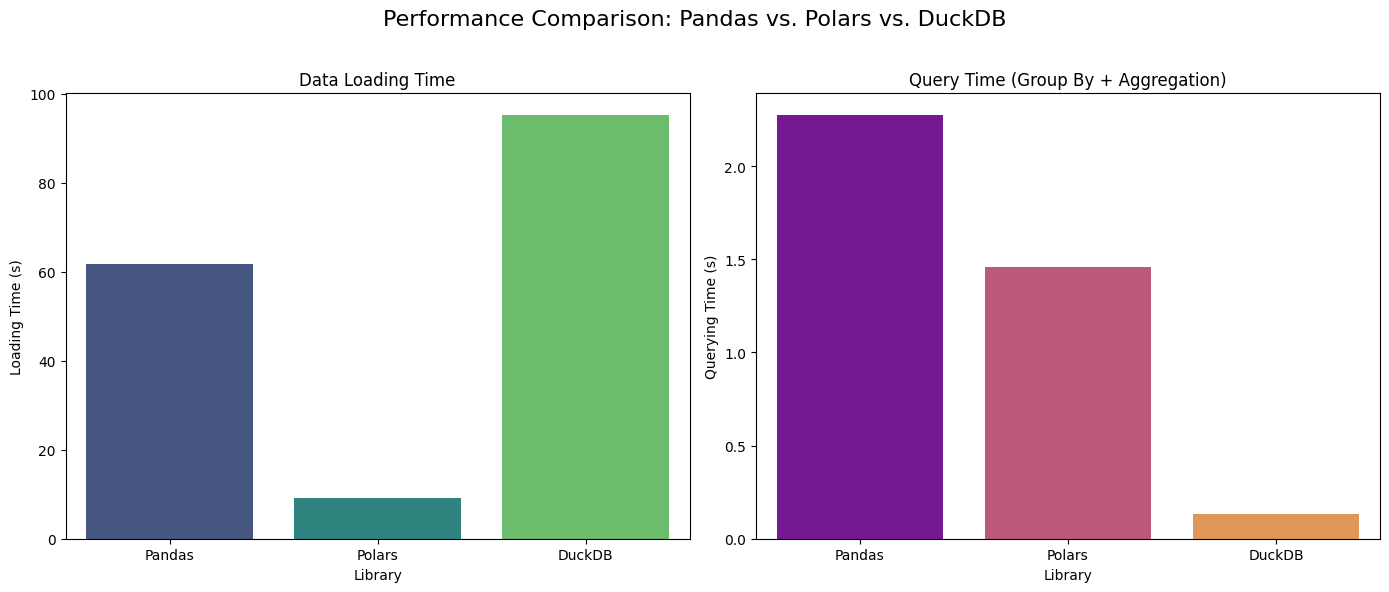
Table of contents
The Dataset
We'll be using the Flight Delay Dataset (2018-2022) from Kaggle, which contains comprehensive flight information including cancellations and delays by airline. This dataset is perfect for performance testing as it includes:
- Combined_Flights_XXXX.parquet files for each year (2018-2022)
- Over 100 million flight records
- Various flight metrics including arrival delays, cancellations, and airline information
- Multiple data formats (CSV and Parquet)
The dataset is extracted from the Marketing Carrier On-Time Performance data table of the "On-Time" database from the TranStats data library, making it a realistic representation of production data scenarios.
The Contenders
1. Pandas
The venerable workhorse of data analysis in Python. Pandas has been the go-to library for data manipulation for over a decade, offering intuitive DataFrame operations and extensive functionality.
Strengths:
- Mature and stable ecosystem
- Extensive documentation and community support
- Familiar API for most data scientists
- Rich set of data manipulation functions
Weaknesses:
- Single-threaded by default
- Higher memory overhead
- Slower performance on large datasets
2. Polars
A modern, fast DataFrame library written in Rust with Python bindings. Polars is designed from the ground up for performance and memory efficiency.
Strengths:
- Multi-threaded operations by default
- Memory-efficient data structures
- Lazy evaluation capabilities
- Rust-based performance optimizations
Weaknesses:
- Relatively new ecosystem
- Smaller community compared to Pandas
- Some API differences from Pandas
3. DuckDB
An in-process analytical database that brings SQL database capabilities directly into your Python environment. DuckDB is designed for analytical workloads and can process data directly from various file formats.
Strengths:
- SQL-based querying
- Columnar storage format
- Excellent analytical query performance
- Can handle data larger than available RAM
Weaknesses:
- Requires SQL knowledge
- Different paradigm from DataFrame libraries
- Limited data manipulation functions compared to Pandas/Polars
Performance Testing Methodology
Our testing approach focuses on three key metrics:
- Data Loading Time: How long it takes to read and load the parquet files
- Memory Usage: The amount of RAM consumed during processing
- Query Performance: Time taken to perform analytical operations
We'll use a memory-safe approach that ensures fair comparison by cleaning up resources between tests.
The Code
Here's the complete benchmarking code we'll use:
import pandas as pd
import polars as pl
import duckdb
import time
import os
import gc
import matplotlib.pyplot as plt
import seaborn as sns

# --- Setup ---
DATA_DIR = '/kaggle/input/flight-delay-dataset-20182022/'
files = [
    os.path.join(DATA_DIR, 'Combined_Flights_2018.parquet'),
    os.path.join(DATA_DIR, 'Combined_Flights_2019.parquet'),
    os.path.join(DATA_DIR, 'Combined_Flights_2020.parquet'),
    os.path.join(DATA_DIR, 'Combined_Flights_2021.parquet'),
    os.path.join(DATA_DIR, 'Combined_Flights_2022.parquet')
]

def run_pandas_analysis(file_list):
    """Loads and queries data using Pandas, then returns the results."""
    print("\n--- Testing Pandas ---")
    start_time = time.time()
    pd_df = pd.concat([pd.read_parquet(f) for f in file_list])
    load_time = time.time() - start_time
    print(f"Loading time: {load_time:.4f} seconds")

    size_mb = pd_df.memory_usage(deep=True).sum() / (1024**2)
    print(f"Pandas DataFrame size: {size_mb:.2f} MB")

    start_time = time.time()
    pd_df['ArrDelay'] = pd.to_numeric(pd_df['ArrDelay'], errors='coerce')
    pd_df.groupby('Operating_Airline')['ArrDelay'].mean().reset_index()
    query_time = time.time() - start_time
    print(f"Querying time: {query_time:.4f} seconds")

    return {
        "Library": "Pandas",
        "Loading Time (s)": load_time,
        "Querying Time (s)": query_time
    }

def run_polars_analysis(file_list):
    """Loads and queries data using Polars, then returns the results."""
    print("\n--- Testing Polars ---")
    start_time = time.time()
    lazy_frames = [pl.scan_parquet(f) for f in file_list]
    pl_df = pl.concat(lazy_frames, how="vertical_relaxed").collect()
    load_time = time.time() - start_time
    print(f"Loading time: {load_time:.4f} seconds")

    size_mb = pl_df.estimated_size('mb')
    print(f"Polars DataFrame size: {size_mb:.2f} MB")

    start_time = time.time()
    pl_df.group_by('Operating_Airline').agg(
        pl.col('ArrDelay').mean().alias('AvgArrDelay')
    )
    query_time = time.time() - start_time
    print(f"Querying time: {query_time:.4f} seconds")

    return {
        "Library": "Polars",
        "Loading Time (s)": load_time,
        "Querying Time (s)": query_time
    }

def run_duckdb_analysis(file_list):
    """Loads and queries data using DuckDB, then returns the results."""
    print("\n--- Testing DuckDB (On-Disk) ---")
    db_file = 'flights.db'
    con = duckdb.connect(db_file)

    start_time = time.time()
    con.execute(
        "CREATE OR REPLACE TABLE flights AS SELECT * FROM read_parquet(?)",
        [file_list]
    )
    load_time = time.time() - start_time
    print(f"Loading time: {load_time:.4f} seconds")

    db_size_info = con.execute("PRAGMA database_size;").fetchone()
    db_size_mb = db_size_info[1].split(" ")[0]
    print(f"DuckDB database size on disk: {db_size_mb} MB")

    start_time = time.time()
    con.execute(
        "SELECT \"Operating_Airline\", AVG(\"ArrDelay\") FROM flights GROUP BY 1"
    ).fetchall()
    query_time = time.time() - start_time

    con.close()
    if os.path.exists(db_file):
        os.remove(db_file)  # Clean up the database file

    print(f"Querying time: {query_time:.4f} seconds")
    return {
        "Library": "DuckDB",
        "Loading Time (s)": load_time,
        "Querying Time (s)": query_time
    }

# --- Main Execution ---
print("Starting memory-safe performance comparison...")
results_list = []

# Run Pandas and collect results
results_list.append(run_pandas_analysis(files))
gc.collect()  # Force garbage collection between runs

# Run Polars and collect results
results_list.append(run_polars_analysis(files))
gc.collect()  # Force garbage collection

# Run DuckDB and collect results
results_list.append(run_duckdb_analysis(files))

# --- Final Summary and Visualization ---
print("\n--- Comparison Summary ---")
results_df = pd.DataFrame(results_list)
print(results_df)

# Create visualization
fig, axes = plt.subplots(1, 2, figsize=(14, 6))
fig.suptitle('Performance Comparison: Pandas vs. Polars vs. DuckDB', fontsize=16)

sns.barplot(x='Library', y='Loading Time (s)', data=results_df, ax=axes[0], palette='viridis')
axes[0].set_title('Data Loading Time')

sns.barplot(x='Library', y='Querying Time (s)', data=results_df, ax=axes[1], palette='plasma')
axes[1].set_title('Query Time (Group By + Aggregation)')

plt.tight_layout(rect=[0, 0, 1, 0.96])
plt.savefig('performance_comparison.png')
print("\nChart saved to 'performance_comparison.png'")
Results Analysis
Let's examine the performance results from our benchmark:
Loading Performance
| Library | Loading Time (seconds) | Memory Usage |
|---|---|---|
| Pandas | 61.74 | 39,667 MB |
| Polars | 9.12 | 12,711 MB |
| DuckDB | 95.30 | 1.7 MB |
Key Insights:
- Polars is the clear winner in loading speed, being 6.8x faster than Pandas
- DuckDB has the slowest loading time but uses minimal memory
- Pandas consumes the most memory, using over 39GB of RAM
Query Performance
| Library | Query Time (seconds) | Performance Ratio |
|---|---|---|
| Pandas | 2.28 | 1x (baseline) |
| Polars | 1.46 | 1.6x faster |
| DuckDB | 0.13 | 17.5x faster |
Key Insights:
- DuckDB dominates query performance, being 17.5x faster than Pandas
- Polars shows solid improvement over Pandas (1.6x faster)
- Pandas is the slowest for analytical queries
Detailed Breakdown
Pandas Performance
- Loading: 61.74 seconds - Slowest due to single-threaded operations
- Memory: 39.67 GB - Highest memory usage due to Python object overhead
- Querying: 2.28 seconds - Limited by single-threaded groupby operations
Polars Performance
- Loading: 9.12 seconds - 6.8x faster than Pandas due to Rust optimizations
- Memory: 12.71 GB - 3x more memory efficient than Pandas
- Querying: 1.46 seconds - 1.6x faster due to multi-threading
DuckDB Performance
- Loading: 95.30 seconds - Slowest loading due to database creation overhead
- Memory: 1.7 MB - Minimal memory usage (data stays on disk)
- Querying: 0.13 seconds - 17.5x faster due to columnar storage and SQL optimization
When to Use Each Library
Choose Pandas When:
- Working with small to medium datasets (< 1GB)
- Need extensive data manipulation functions
- Team is already familiar with Pandas
- Require maximum compatibility with existing code
Choose Polars When:
- Working with large datasets (1GB - 100GB)
- Need better performance than Pandas
- Want familiar DataFrame API
- Have multi-core systems available
Choose DuckDB When:
- Working with very large datasets (> 100GB)
- Need complex analytical queries
- Want SQL-based querying
- Memory is limited
- Performing one-time analysis tasks
Memory Management Considerations
Our testing approach includes several memory management strategies:
- Garbage Collection: Force cleanup between library tests
- Function Scope: DataFrames are destroyed when functions exit
- Resource Cleanup: DuckDB database files are removed after testing
This ensures fair comparison and prevents memory leaks from affecting results.
Real-World Implications
The performance differences we observed have significant implications for data science workflows:
Development Speed vs. Runtime Performance
- Pandas: Faster development, slower execution
- Polars: Balanced development and execution speed
- DuckDB: Slower development (SQL), fastest execution
Scalability Considerations
- Pandas: Limited by single-threaded operations and memory constraints
- Polars: Good scalability up to available RAM
- DuckDB: Excellent scalability, limited only by disk space
Cost Implications
- Pandas: May require expensive high-memory instances
- Polars: More cost-effective for large datasets
- DuckDB: Most cost-effective for very large datasets
Conclusion
Our performance comparison reveals that each library has its optimal use case:
- Pandas remains the most user-friendly option for small datasets and rapid prototyping
- Polars offers the best balance of performance and usability for medium to large datasets
- DuckDB excels at analytical queries on very large datasets where memory is a constraint
The choice between these libraries should be based on:
- Dataset size and available memory
- Query complexity and performance requirements
- Team expertise and development time constraints
- Infrastructure costs and scalability needs
For the flight delay dataset (which is quite large), Polars would be the best choice for most use cases, offering excellent performance improvements over Pandas while maintaining a familiar API. DuckDB would be ideal for complex analytical queries where query performance is critical.
Future Considerations
As these libraries continue to evolve, we can expect:
- Pandas: Potential performance improvements through Arrow integration
- Polars: Growing ecosystem and more compatibility features
- DuckDB: Enhanced SQL features and better integration with data science workflows
The data science ecosystem is becoming more specialized, and having multiple tools in your toolkit allows you to choose the right tool for each specific task.
This analysis demonstrates the importance of choosing the right data processing library for your specific use case. While Pandas remains the most familiar option, modern alternatives like Polars and DuckDB can provide significant performance benefits for large-scale data analysis.